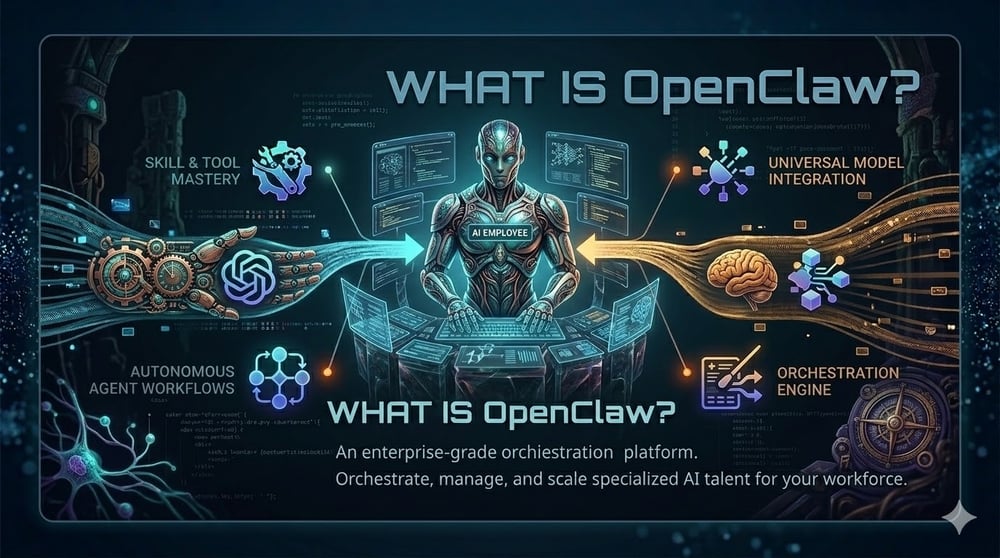
Developer tools rarely cause as much excitement—and fear—as OpenClaw. Launched in November 2025 and renamed twice before settling on its crustacean‑inspired moniker, it swiftly became the most‑starred GitHub project. OpenClaw is an open‑source AI agent that lives on your own hardware and connects to large language models (LLMs) like Anthropic’s Claude or OpenAI’s GPT. Unlike a typical chatbot that forgets you as soon as the tab closes, OpenClaw remembers everything—preferences, ongoing projects, last week’s bug report—and can act on your behalf across multiple communication channels. Its appeal lies in turning a passive bot into an assistant with hands and a memory. But with great power come complex operations and serious security risks. This article unpacks the hype, explains the architecture, walks through setup, highlights risks, and offers guidance on whether OpenClaw belongs in your workflow. Throughout, we’ll note how Clarifai’s compute orchestration and Local Runners complement OpenClaw by making it easier to deploy and manage models securely.
OpenClaw began life as Clawdbot in November 2025, morphed into Moltbot after a naming clash, and finally rebranded to its current form. Within three months it amassed more than 200 000 GitHub stars and attracted a passionate community. Its creator, Peter Steinberger, joined OpenAI, and the project moved to an open‑source foundation. The secret to this meteoric rise? OpenClaw is not another LLM; it’s a local orchestration layer that gives existing models eyes, ears, and hands.
To understand OpenClaw intuitively, think of it as a pet lobster:
|
Element |
Description |
Files & Components |
|
Tank (Your machine) |
OpenClaw runs locally on your laptop, homelab or VPS, giving you control and privacy but also consuming your resources. |
Hardware (macOS, Linux, Windows) with Node.js ≥22 |
|
Food (LLM API key) |
OpenClaw has no brain of its own. You must supply API keys for models like Claude, GPT or your own model via Clarifai’s Local Runner. |
API keys stored via secret management |
|
Rules (SOUL.md) |
A plain‑text file telling your lobster how to behave—be helpful, have opinions, respect privacy. |
SOUL.md, IDENTITY.md, USER.md |
|
Memory (memory/ folder) |
Persistent memory across sessions; the agent writes a diary and remembers facts. |
memory/ directory, MEMORY.md, semantic search via SQLite |
|
Skills (Plugins) |
Markdown instructions or scripts that teach OpenClaw new tricks—manage email, monitor servers, post to social media. |
Files in skills/ folder, marketplace (ClawHub) |
This framework demystifies what many call a “lobster with feelings.” The gateway is the tank’s control panel. When you message the agent on Telegram or Slack, the Gateway (default port 18789) routes your request to the agent runtime, which loads relevant context from your files and memory. The runtime compiles a giant system prompt and sends it to your chosen LLM; if the model requests tool actions, the runtime executes shell commands, file operations or web browsing. This loop repeats until an answer emerges and flows back to your chat app.
Why local? Traditional chatbots are “brains in jars”—stateless and passive. OpenClaw stores your conversations and preferences, enabling context continuity and autonomous workflows. However, local control means your machine’s resources and secrets are at stake; the lobster doesn’t live in a safe aquarium but in your own kitchen, claws and all. You must feed it API keys and ensure it doesn’t escape into the wild.
Developers fall in love with OpenClaw because it orchestrates tasks across channels, tools and time—something most chatbots can’t do. Consider a typical day:
This cross‑channel orchestration eliminates context switching and ensures tasks happen where people already spend their time. Developers also appreciate the skill system: you can drop a markdown file into skills/ to add capabilities, or install packages from ClawHub. Need your assistant to do daily stand‑ups, monitor Jenkins, or manage your Obsidian notes? There’s a skill for that. And because memory persists, your agent recalls last week’s bug fix and your disdain for pie charts.
OpenClaw’s productivity extends beyond development. Real‑world use cases documented by MindStudio include overnight autonomous work (research and writing), email/calendar management, purchase negotiation, DevOps workflows, and smart‑home control. Cron jobs are the backbone of this autonomy; version 2.26 addressed serious reliability problems such as duplicate or hung executions, making automation trustworthy.
|
Task category |
Shell/File |
Browser control |
Messaging integration |
Cron jobs |
Skills available |
|
Personal productivity (email, calendar, travel) |
✔ |
✔ |
WhatsApp, Slack, Telegram, Feishu |
✔ |
Yes (e.g., Gmail manager, Calendar sync) |
|
Developer workflows (stand‑ups, code review, builds) |
✔ |
✔ |
Slack, Discord, GitHub comments |
✔ |
Yes (Git commit reader, Pull request summarizer) |
|
Operations & monitoring (server health, alerts) |
✔ |
✔ |
Telegram, WhatsApp |
✔ |
Yes (Server monitor, PagerDuty integration) |
|
Business processes (purchase negotiation, CRM updates) |
✔ |
✔ |
Slack, Feishu, Lark |
✔ |
Yes (Negotiator, CRM updater) |
This matrix shows why developers obsess: the agent touches every stage of their day. Clarifai’s Compute Orchestration adds another dimension. When an agent makes LLM calls, you can choose where those calls run—public SaaS, your own VPC, or an on‑prem cluster. GPU fractioning and autoscaling reduce cost while maintaining performance. And if you need to keep data private or use a custom model, Clarifai’s Local Runner lets you serve the model on your own GPU and expose it through Clarifai’s API. Thus, developers obsessed with OpenClaw often integrate it with Clarifai to get the best of both worlds: local automation and scalable inference.
Quick summary – Why developers are obsessed?
|
Question |
Summary |
|
What makes OpenClaw special? |
It runs locally, remembers context, and can perform multi‑step tasks across messaging platforms and tools. |
|
Why do developers rave about it? |
It automates stand‑ups, code reviews, monitoring and more, freeing developers from routine tasks. The skill system and cross‑channel support make it flexible. |
|
How does Clarifai help? |
Clarifai’s compute orchestration lets you manage LLM inference across different environments, optimize costs, and run custom models via Local Runners. |
Installing OpenClaw is straightforward but requires attention to detail. You need Node.js 22 or later, a suitable machine (macOS, Linux or Windows via WSL2) and an API key for your chosen LLM. Here’s a Setup & Personalization Checklist:
|
File |
Purpose |
Notes |
|
AGENTS.md |
List of agents and their instructions; tells the runtime to read SOUL.md, USER.md and memory before each session. |
Defines agent names, roles and tasks. |
|
SOUL.md |
Core principles and rules. |
Example: “Be helpful. Have opinions. Respect privacy.” |
|
IDENTITY.md |
Personality traits, name, emoji and avatar. |
Makes the agent feel human. |
|
USER.md |
Your profile: pronouns, timezone, context. |
Helps schedule tasks correctly. |
|
TOOLS.md |
Lists available built‑in tools and custom skills. |
Tools include shell, file, browser, cron. |
|
HEARTBEAT.md |
Defines periodic tasks via cron expressions. |
Runs every 30 minutes by default. |
|
memory/ folder |
Stores chat history and facts as Markdown. |
Persisted across sessions. |
Quick summary – Setup and personalization
|
Question |
Summary |
|
How do I install OpenClaw? |
Install via npm (npm install -g openclaw@latest), run openclaw onboard --install-daemon, and follow the wizard. |
|
What files do I edit? |
Customize SOUL.md, IDENTITY.md, USER.md, and add skills via markdown. Use HEARTBEAT.md for periodic tasks. |
|
How do I run my own model? |
Use Clarifai’s Local Runner: run clarifai model local-runner to expose your model through Clarifai’s API, then configure OpenClaw to call that model. |
OpenClaw’s power comes at a cost: security risk. Running an autonomous agent on your machine with file, network and system privileges is inherently dangerous. Several serious vulnerabilities have been disclosed in 2026:
To safely use OpenClaw, climb this ladder:
Why are these measures needed? Because the local‑first design implicitly trusts localhost traffic. Researchers found that even when the gateway bound to loopback, a malicious page could open a WebSocket to it and use brute force to guess the password. And while sandboxing prevents prompt injection from executing arbitrary commands, it cannot stop network‑level hijacking. Additionally, companies risk compliance issues when employees run unsanctioned agents; only 15 % had updated policies by late 2025.
|
CVE |
Impact |
Patch/Status |
|
CVE‑2026‑25253 |
Token exfiltration via Control UI WebSocket; enables one‑click remote code execution. |
Fixed in version 2026.1.29. Update and disable auto‑connect to untrusted URLs. |
|
Localhost trust flaw (unassigned CVE) |
Malicious websites can hijack the gateway via cross‑site WebSocket; brute‑force the password and register malicious scripts. |
Patched in version 2026.2.25. Treat Gateway as internet‑facing; use origin allow‑lists and mTLS. |
|
Multiple CVEs (e.g., 27486) |
Privilege‑escalation vulnerabilities in the CLI and authentication bypasses. |
Update to latest versions; monitor security advisories. |
Quick summary – Security & privacy
|
Question |
Summary |
|
Is OpenClaw safe? |
It can be safe if you patch quickly, isolate the gateway, manage secrets, and vet skills. Serious vulnerabilities have been found and patched. |
|
How do I mitigate risk? |
Follow the Agent Risk Mitigation Ladder: patch, isolate, limit privileges, manage secrets, vet skills, and monitor. Use Clarifai’s Control Center for centralized monitoring. |
OpenClaw’s power is accompanied by complexity. Many early adopters hit a “Day 2 wall”: the thrill of seeing an AI agent automate your tasks gives way to the reality of managing cron jobs, secrets and updates. Here’s a balanced view.
|
Framework |
Customization |
Ease of use |
Governance & Security |
Cost predictability |
Best for |
|
OpenClaw |
High (edit rules, add skills, run locally) |
Medium – requires CLI and file editing |
Low by default; requires user to apply security controls |
Variable – depends on LLM usage and compute |
Tinkerers, developers who want full control |
|
LangGraph / CrewAI |
Moderate – workflow graphs, multi‑agent composition |
High – offers built‑in abstractions |
Higher – includes execution governance and tool permissioning |
Moderate – depends on provider usage |
Teams wanting multi‑agent orchestration with guardrails |
|
Clarifai Compute Orchestration with Local Runner |
Moderate – deploy any model and manage compute |
High – UI/CLI support for deployment |
High – enterprise‑grade security, role‑based access, autoscaling |
Predictable – centralized cost controls |
Organizations needing secure, scalable AI workloads |
|
ChatGPT/GPT‑4 via API |
Low – no persistent state |
High – plug‑and‑play |
High – managed by provider |
Pay‑per‑call |
Simple Q&A, single‑channel tasks |
Trade‑offs: OpenClaw gives unmatched flexibility but demands technical literacy and constant vigilance. For mission‑critical workflows, a hybrid approach may be ideal: use OpenClaw for local automation and Clarifai’s compute orchestration for model inference and governance. This reduces the attack surface and centralizes cost management.
Agentic AI is not a fad; it signals a shift toward AI that acts. OpenClaw’s success illustrates demand for tools that move beyond chat. However, the ecosystem is maturing quickly. The February 2026 2.23 release introduced HSTS headers and SSRF policy changes; 2.26 added external secrets management, cron reliability and multi‑lingual memory embeddings; and new releases add features like multi‑model routing and thread‑bound agents. Clarifai’s roadmap includes GPU fractioning, autoscaling and integration with external compute, enabling hybrid deployments.
As of March 2026, we are somewhere between stages 1 and 2. Rapid release cadences (five releases in February alone) signal a push toward operational maturity, but security incidents continue to surface. Expect deeper integration between local‑first agents and managed compute platforms, and increased attention to consent, logging and auditing. The future of agentic AI will likely involve multi‑agent collaboration, retrieval‑augmented generation and RAG pipelines that blend internal knowledge with external data. Clarifai’s platform, with its ability to deploy models anywhere and manage compute centrally, positions it as a key player in this landscape.
What exactly is OpenClaw? It’s an open‑source AI agent that runs locally on your hardware and orchestrates tasks across chat apps, files, the web and your operating system. It isn’t an LLM; instead it connects to models like Claude or GPT via API and uses skills to act.
Is OpenClaw safe to use? It can be, but only if you keep it updated, isolate the gateway, manage secrets properly, vet your skills and monitor activity. Serious vulnerabilities like CVE‑2026‑25253 have been patched, but new ones may emerge. Think of it as running a powerful script on your machine—treat it with respect.
Do I need to know how to code? Basic usage doesn’t require coding. You install via npm and edit plain‑text files (SOUL.md, IDENTITY.md, USER.md). Skills are also defined in markdown. However, customizing complex workflows or building skills will require scripting knowledge.
What are skills and how do I install them? Skills are plugins written in markdown or code that extend the agent’s abilities—reading GitHub, sending emails, controlling a browser. You can create your own or install them from the ClawHub marketplace. Be cautious: some skills have been found to be malicious.
Can I run my own model with OpenClaw? Yes. Use Clarifai’s Local Runner to serve a model on your machine. The runner connects to Clarifai’s control plane and exposes your model via API. Configure OpenClaw to call this model via the provider settings.
How do I secure my instance? Follow the Agent Risk Mitigation Ladder: update to the latest release, isolate the gateway, limit privileges, manage secrets, vet skills and monitor activity. Treat the agent as an internet‑facing service.
What happens if OpenClaw makes a mistake? Because the LLM drives reasoning, agents can hallucinate or misinterpret instructions. Keep approval prompts on for high‑risk actions, monitor logs and correct behaviour via SOUL.md or skill adjustments. If a job fails, use /stop to clear the backlog.
Are there alternatives for less technical users? Yes. Frameworks like LangGraph, CrewAI, and commercial agent platforms provide multi‑agent orchestration with governance and easier setup. Clarifai’s compute orchestration can run your models with built‑in security and cost controls. For simple Q&A, using ChatGPT or Clarifai’s API may be sufficient.
OpenClaw embodies the promise and peril of agentic AI. Its local‑first design and persistent memory turn chatbots into active assistants capable of automating work across multiple channels. Developers adore it because it feels like having a tireless teammate—an agent that writes stand‑up reports, files pull requests, monitors servers and even negotiates purchases. Yet this power demands vigilance: serious vulnerabilities have exposed tokens and allowed remote code execution, and the skill ecosystem harbours malicious entries. Setting up OpenClaw requires command‑line comfort, careful configuration, and ongoing maintenance. For many, the Day 2 wall is real.
The path forward lies in balancing local autonomy with managed governance. OpenClaw continues to mature with features like external secrets management and multi‑lingual memory embeddings, but long‑term adoption will depend on stronger security practices and integration with control‑plane platforms. Clarifai’s compute orchestration and Local Runners offer a blueprint: deploy any model on any environment, optimize costs with GPU fractioning and autoscaling, and expose local models securely via API. Combining OpenClaw’s flexible agent with Clarifai’s managed infrastructure can deliver the best of both worlds—automation that is powerful, private and safe. As agentic AI evolves, one thing is clear: the era of passive chatbots is over. The future belongs to lobsters with hands, but only if we learn to keep them in the tank.